Sun Diamond Clay Cutter - STL Digital File: A Practical Guide to Printing and Usage
Creating intricate polymer clay jewelry or detailed cookie designs often comes down to the precision of your tools. The Sun Diamond Clay Cutter - STL Digital File offers a versatile solution for makers who own 3D printers and want to expand their creative arsenal without waiting for shipping. This digital bundle provides immediate access to eight distinct sizes and two specialized cutting edge profiles, allowing you to curate custom cutter combinations that fit specific project needs. However, transitioning from physical tools to printable files requires a shift in mindset. Understanding the technical specifications and common pitfalls of STL files is essential to avoid wasted filament, failed prints, or damage to your clay.
Understanding the Two Cutting Edge Profiles
One of the most frequent mistakes beginners make when downloading this bundle is assuming all files serve the same purpose. This pack includes two distinct cutter types, and selecting the wrong one for your material can lead to frustration. Recognizing the difference between the standard wall and the Sharp Edge (SE) variant is critical for achieving clean results.
The Standard 0.7mm Wall
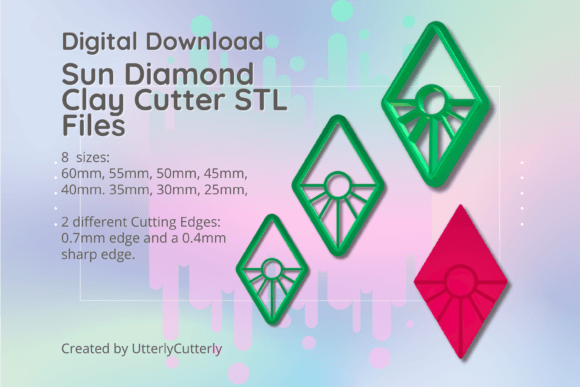
The standard version features a 0.7mm wall thickness with a 3mm thick base and a 12mm height. This profile is robust and generally easier to print successfully on FDM printers. It is ideal for softer clays, thicker cookie doughs, or situations where durability is prioritized over razor-sharp definition. If you are new to printing clay cutters, start here to dial in your printer settings before attempting more delicate geometries.
The Sharp Edge (SE) Variant
Files abbreviated as SE in the download folder feature a 1mm support wall tapering to a precise 0.4mm cutting edge. While this produces superior detail in polymer clay, it demands higher print resolution and careful handling. A common error is printing the SE version with a nozzle larger than 0.4mm or using excessive cooling, which can cause the thin edge to warp or detach from the base during printing. Reserve the SE files for detailed jewelry work where crisp lines are non-negotiable, and ensure your bed adhesion is perfect before starting.
Navigating Size Selection and Measurement Standards
This bundle includes eight sizes: 60mm, 55mm, 50mm, 45mm, 40mm, 35mm, 30mm, and 25mm. Misunderstanding how these dimensions are calculated is a frequent source of disappointment. Cutter size is measured from the longest ends of the design, not the width of the bounding box or the inner cutting area.
If you are designing a jewelry piece with a strict 40mm width constraint, a 40mm sun diamond cutter may actually be too wide depending on its orientation. Always measure the actual printed object or check the dimensions in your slicer software before committing to a full print run. For creators building a cohesive collection, we recommend test-printing the 35mm and 45mm sizes first. These mid-range options offer the best balance of detail and structural integrity, serving as reliable benchmarks for scaling up to 60mm or down to 25mm.
Critical Considerations for Embossing and Clay Thickness
Functional versatility extends beyond just cutting; many users utilize these cutters for embossing as well. A vital specification often overlooked is the embossing line height, which stands at 10.5mm. This dimension dictates your minimum clay thickness.
Practical Warning: Do not attempt to use the embossing feature on clay sheets thinner than 1.5mm. Because the embossing lines are 10.5mm tall relative to the base, pressing them into thin clay will result in the cutter bottoming out against your work surface. This not only ruins the impression but can also damage the delicate printed edges of your cutter. Always condition your clay to a consistent thickness greater than 1.5mm when utilizing the textured aspects of the Sun Diamond Clay Cutter - STL Digital File. Using a set of roller guides or pasta machine settings can help maintain this consistency effortlessly.
Optimizing Print Settings for Longevity
Digital files are only as good as the physical objects they produce. Even perfectly designed STL files can fail if printed with inappropriate parameters. Since these cutters interact with moisture and pressure, print orientation and material choice matter significantly.
- Orientation: Always print cutters upright with the cutting edge facing up. Printing flat on the bed creates layer lines along the cutting edge, resulting in a rough finish that tears clay rather than slicing it.
- Infill and Walls: Avoid low infill percentages. A 3mm base thickness is specified for strength; printing with sparse infill makes the base flexible and prone to snapping under hand pressure. Use at least 3-4 perimeter walls to ensure the cutter maintains its shape during use.
- Material Safety: If using these cutters for food items like cookies, verify that your filament is food-safe and that your nozzle is stainless steel. Brass nozzles can leach heavy metals. For polymer clay exclusively, standard PLA or PETG is sufficient and offers excellent rigidity.
Managing Digital Assets and Expectations
Because this is a digital download and not a physical item, there is no return window once files are accessed. Before purchasing, confirm that you have a functioning 3D printer and basic slicing knowledge. Many buyers mistakenly assume these files include pre-made G-code; they do not. You must slice the STL files yourself according to your specific printer’s calibration.
Additionally, keep your original files organized. With new STL files added to the store weekly, maintaining a structured library prevents version confusion. If you encounter printing issues, revisit the file specifications rather than blaming the design. Often, adjusting layer height from 0.2mm to 0.12mm or increasing base layers resolves adhesion problems with the 0.4mm SE edge. All our cutters are tested before being sold as part of our standard quality assurance, so persistent failures usually indicate a need for printer maintenance or setting adjustments rather than a flawed file.
Curating a Versatile Cutter Collection
The true value of the Sun Diamond Clay Cutter - STL Digital File lies in its modularity. Rather than viewing this as a standalone tool, consider how it integrates with other geometric shapes in your library. The eight included sizes allow for graduated design work, such as creating layered sunburst earrings or nested cookie sets. By mastering the specific requirements of both the standard and SE profiles, you transform a simple digital purchase into a sustainable production workflow. Take the time to understand these nuances, and your printed cutters will serve your creative business reliably for years to come.